

안드로이드 앱을 만들 때, 버튼은 꼭 쓰게 된다!
찾아보면, Button과 AppCompatButton 두개의 선택지가 있다.
다음은 AppCompatButton과 Button의 예시이다.
<androidx.appcompat.widget.AppCompatButton
            android:id="@+id/cancelBtn"
            android:layout_width="match_parent"
            android:layout_height="44dp"
            android:layout_weight="1"
            android:layout_marginStart="21dp"
            android:layout_marginEnd="5dp"
            android:background="@drawable/shape_button_g400_24"
            android:text="취소하기"
            android:fontFamily="@font/wanted_sans_bold"
            android:textSize="14sp"
            android:textColor="@color/blue_50" />

        <Button
            android:id="@+id/nextBtn"
            android:layout_width="match_parent"
            android:layout_height="44dp"
            android:layout_weight="1"
            android:layout_marginStart="5dp"
            android:layout_marginEnd="21dp"
            android:background="@drawable/shape_button_b500_24"
            android:text="@string/assign_start"
            android:fontFamily="@font/wanted_sans_bold"
            android:textSize="14sp"
            android:textColor="@color/white" />
다른점?
왼쪽은 AppCompatButton, 오른쪽이 Button이다. 딱 봤을 때 차이는 보이지 않지만, 잘 보면 자간 간격이 살짝 다르다!
그리고, Button의 경우 background의 설정이 안된다.
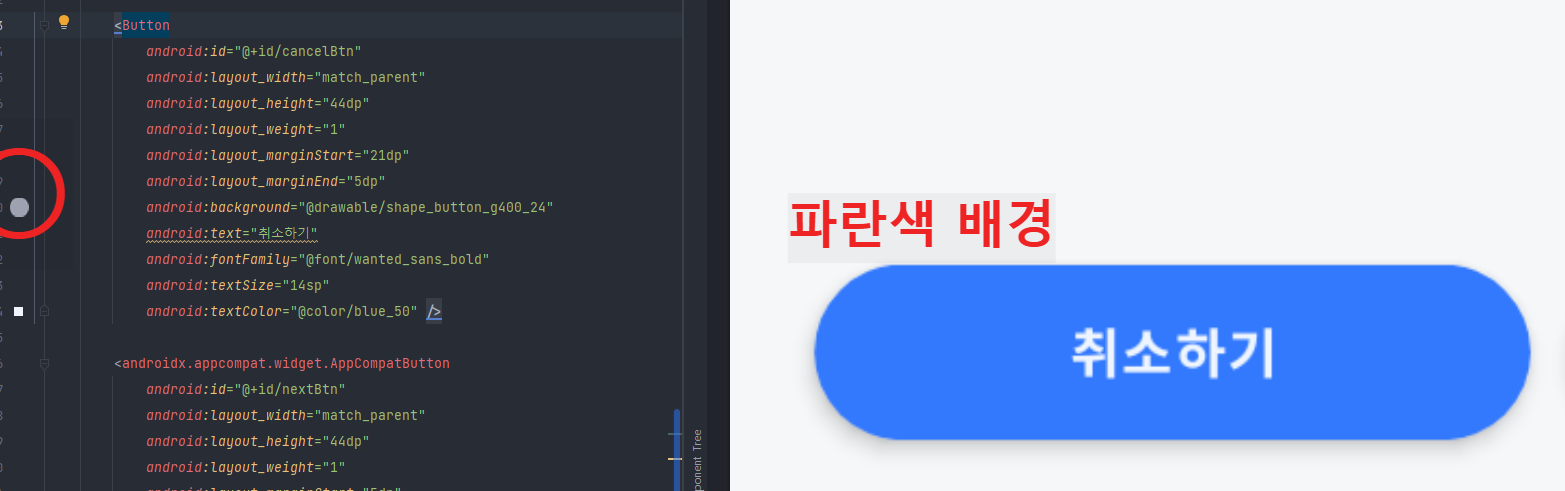
다음 코드를 보면 Button의 경우, background에 회색 배경+동그란 모양을 설정했지만 동그란 모양만 반영되어있다.
왜 다를까?
Button과 AppCompatButton의 차이는 주로 호환성과 스타일링 옵션에 있다.
두 클래스 모두 안드로이드에서 버튼을 구현하기 위한 위젯이지만, AppCompatButton은 AppCompat 라이브러리의 일부로, 더 광범위한 호환성과 최신 테마 스타일을 지원한다.
1. Button
- 기본적인 Android Framework의 버튼 클래스
- 사용하는 기기의 API 수준과 테마에 따라 버튼의 스타일과 동작이 다를 수 있다.
- 최신 Material Design 요소를 지원하지 않을 수도 있다.
2. AppCompatButton
- AndroidX 라이브러리에 포함된 클래스 (androidx.appcompat.widget.AppCompatButton).
- 하위 호환성을 제공하기 위해 설계되었으며, 최신 테마와 Material Design 가이드를 잘 따른다.
- AppCompat 라이브러리를 사용하는 프로젝트에서는 자동으로 Material Design 스타일과 속성이 적용된다.
- 다크 모드나 동적 테마 변경과 같은 최신 기능 지원이 더 잘 되어 있다.
한마디로, Button은 기기 자체의 테마, 프로젝트 내 테마에 종속되어 있다. 그러나, AppCompatButton의 경우 더 자유롭게 변경이 가능하다. AppCompatButton은 하위 호환성과 Metarial Design을 염두에 주고 만든 디자인이다.

Button을 꼭 써야겠다면, Themes.xml에서 Theme.MaterialComponents.Light에서 Theme.AppCompat.Light....로 바꿔주면 된다.
그러나 AppCompatButton이 더욱 편하니 AppcompatButton을 사용하길 추천한다.(선택은 자유)
'CS > Android' 카테고리의 다른 글
| [Android] Lottie 애니메이션을 사용해보자 (0) | 2024.11.22 |
|---|---|
| [Android][JAVA] 컨페티 추가하기 (0) | 2024.10.01 |

